
Features
Main Features
EASY-CONNECT FACIAL RECOGNITION SYSTEM
- Effortless Plug and Play installation.
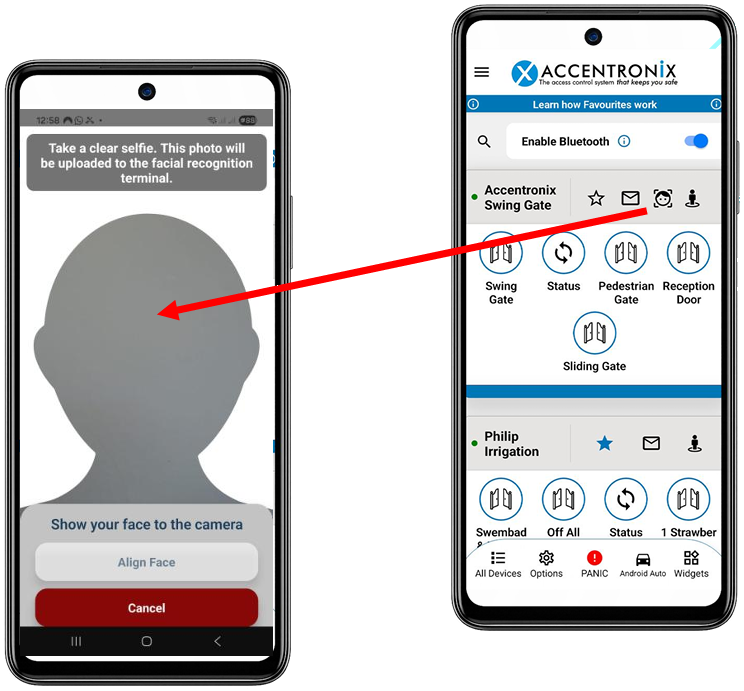
- Users enrol their own faces through the Accentronix App.
- Visitor Access QR Codes.
- Fully integrated with the Accentronix eco system.
- Can be installed and configured in minutes by anyone.
- No special training or PC needed.
- 5-Port POE switch Included.
- Anti-passback and Time & Attendance features.
- Works with any Hikvision Facial Terminal.
- Subscription includes: Unlimited users and connected facial scanners, SIM & data.
- Free for the first year, then R350/month (Billed Annually)
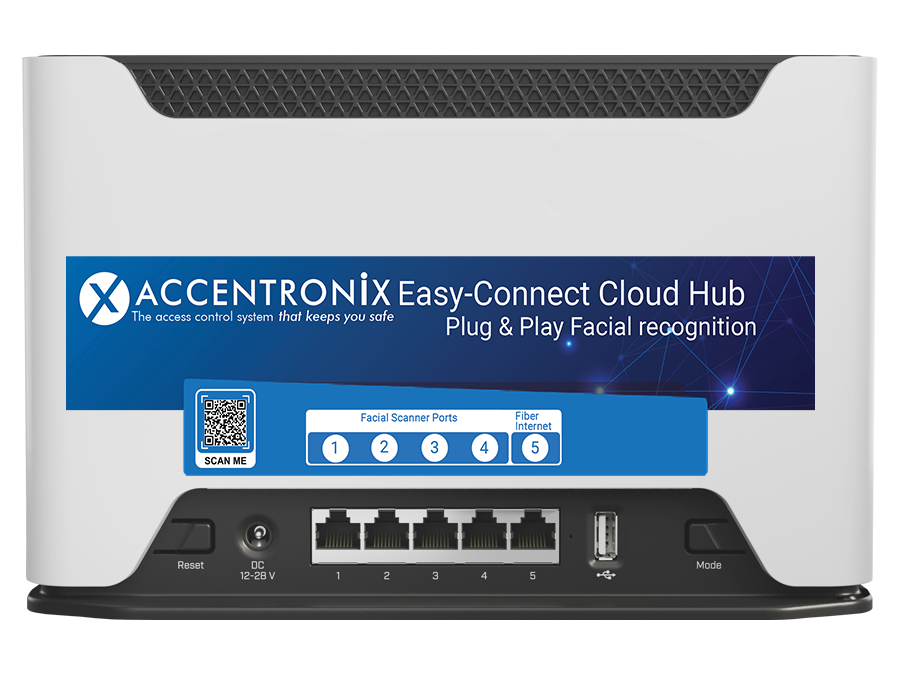
The Accentronix Cloud Hub features an active built-in 4G/LTE SIM managed by Accentronix, with optional fibre connectivity via LAN port 5.
Step 1: Connect the Facial Scanners to the supplied POE switch to remotely power them. The POE switch needs to be connected to port 1 of the Cloud Hub. Multiple switches and Facial scanners can be connected to expand the system.
Step 2: Connect the (N/O, COM and N/C) relay output of the facial scanner to control the gate/door.
Step 3: Visit www.accentronix.co.za, navigate to the Login page, sign into your Accentronix Portal and click on ‘Register Device’.
Step 4: Add access control users and their restrictions.
Step 5: Users will receive a welcome WhatsApp to download the Accentronix Smart Home App.
Step 6: A new user will then use the Accentronix App to take a selfie and enrol themselves.
- Administrators can choose whether registered access-control users may enrol themselves or if their selfies must be manually verified first.
- New Facial Scanners will automatically appear on the Accentronix portal as they are plugged in - simply give each one a name i.e. Entrance or Exit.
- Settings such as detection distance and pulse duration are configured directly from the website.
- The system continues to operate at 100% even if the internet connection is temporarily lost.
- A 5-Port POE Switch (54Vdc) to remotely power the Facial Terminals is included with the Cloud Hub.
- If you need to use a backup power supply, the 54V POE switch cannot be used. In this case simply power the Cloud Hub and Facial Terminals directly with max 12Vdc.
- Supports 1500 to 10 000 faces depending on the Hikvision Facial Terminal model. All the latest Hikvision facial terminal models supporting ISAPI are compatible with the Cloud Hub.
- Hikvision Facial Terminals with an Accentronix sticker on is plug-and-play. If you want to use a new or existing terminal, simply create a specific username and password on the facial terminal (contact Accentronix tech support for details). As soon as the facial terminal is plugged into the Cloud Hub, it will automatically be defaulted and re-configured to Accentronix. All usernames and faces will also be deleted, so you will NOT be able to make any changes on the terminal unless you completely default it to factory settings. The terminal will then instantly appear on the Accentronix portal from where it will be controlled.
IMPORTANT: All security settings and IP addresses are preconfigured on both the Facial Scanners and the Easy-Connect Cloud Hub. All settings are locked, making it impossible to change anything by connecting the devices to your own computer.
- Effortless Plug & Play installation. No special training or PC needed - just instant use.
- Can be installed and configured in minutes by anyone.
- 5-Port POE Switch to remotely power Facial Terminals included with the Cloud Hub.
- If you need to use a backup power supply, the POE switch cannot be used. In this case simply power the Cloud Hub and Facial Terminals with max 12Vdc.
- Simply apply power and register/manage the system on the Accentronix website via the Login page.
- Users enrol their own faces through the Accentronix Smart Home App.
- Users and restrictions are managed seamlessly online.
- Subscription includes: Unlimited users and connected facial scanners, SIM & data.
- Free for the first year, then R350/month (Billed Annually)
- Liveness detection and anti-spoofing using the latest facial recognition technology.
- Can be mounted outside on a gooseneck with a stainless steel rain shield.
- 5-Port POE Switch (55Vdc) to remotely power Facial Terminals included with the Cloud Hub.
- If you need to use a backup power supply, the 54V POE switch cannot be used. In this case simply power the Cloud Hub and Facial Terminals directly with max 12Vdc.
- Supports 1500 to 10 000 faces depending on Hikvision Facial Terminal
*Included sim cards for South Africa only.
*Sim cards managed with subscription - Please see Terms of service